
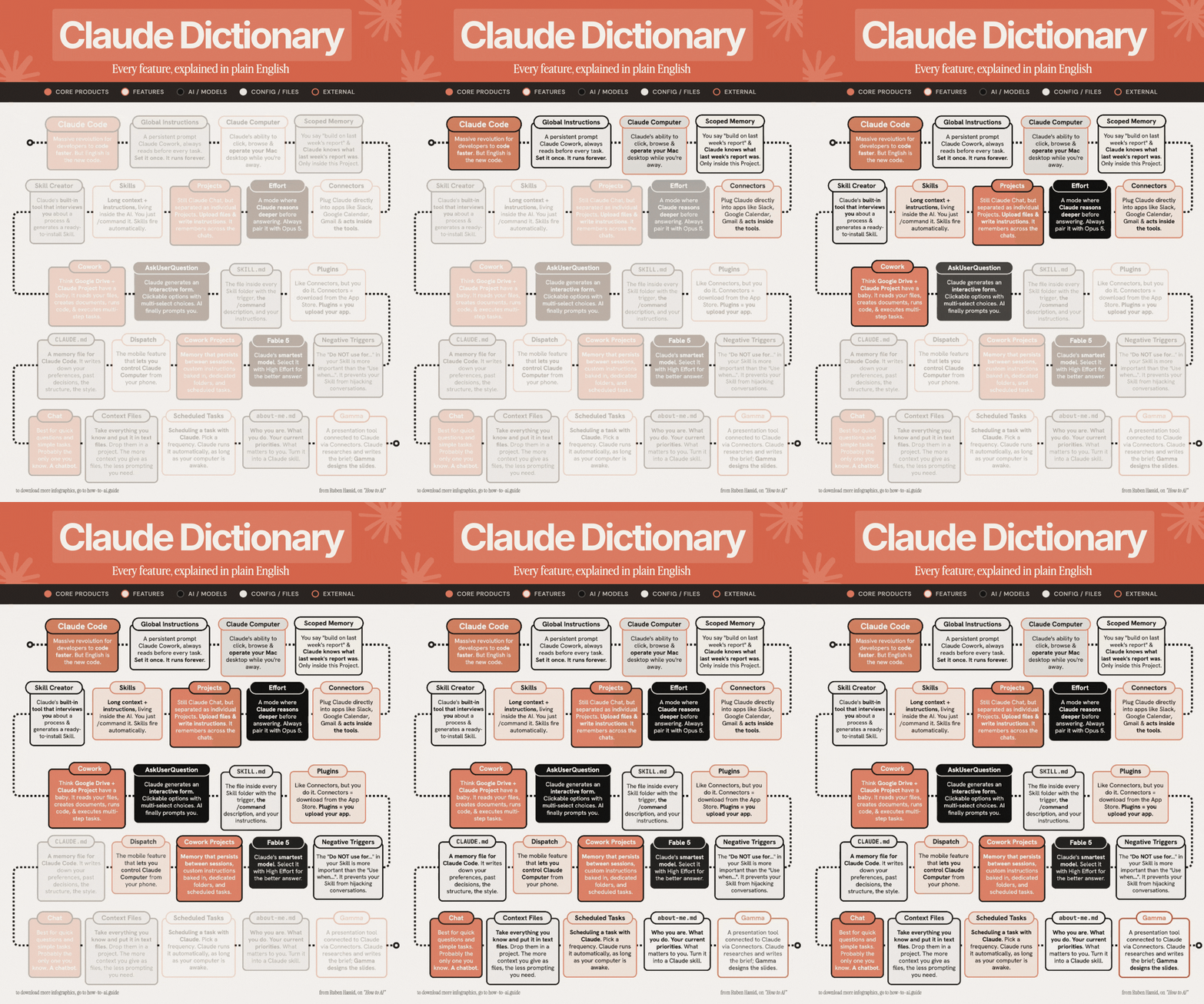
In a recent LinkedIn post, Ruben Hassid provides a comprehensive guide to understanding the various features of Claude AI, aiming to help users move beyond basic chat interactions to leverage the AI’s full potential. Hassid frames the progression of Claude’s capabilities through distinct layers, comparing basic chat to texting a stranger and advanced features to building a knowledgeable team.
“Chat = texting a stranger who forgets you. Features = hiring a team that already knows the job. Full Setup = training Claude that runs without you.”
As Hassid points out, most users remain at the foundational level of interacting with AI. His post breaks down Claude’s functionalities into five distinct layers, each building upon the last to unlock more sophisticated applications.
Layer 1: The Foundational Chat Experience
Hassid identifies the basic chat function as the entry point for 95% of users. This layer includes the standard interaction where a user types a query and receives an answer. He also mentions ‘High Effort’ for deeper reasoning and ‘Fable 5’ as the most advanced model for complex tasks within this basic framework. For those looking to deepen their understanding of these fundamentals, Hassid directs readers to how-to-claude.ai.
Layer 2: Features That Enable Memory and Context
Moving beyond simple chat, Hassid introduces features designed to give Claude a persistent memory and understanding of context. This includes ‘Projects,’ where users can upload files and instructions for Claude to remember, and ‘Scoped Memory,’ which allows specific instructions to be recalled. Hassid also highlights ‘Context Files’ and the ‘about-me.md’ skill, which he describes as a way to imbue Claude with personal information and preferences.
“Projects: Upload file & instructions. It remembers. Scoped Memory. Prompt ‘do like’ & it knows it.”
He emphasizes that these features are accessible for free, available through a welcome email. Hassid also offers free downloads of his ‘Skills’ at how-to-ai.guide.
Layer 3: Building Persistent Instructions with Skills
In the third layer, Hassid delves into ‘Skills,’ which are described as long-term instructions that reside within the AI. A key feature here is the ‘Skill Creator,’ an AI-driven tool that interviews users to help build these persistent skills. Hassid explains the concept of a ‘SKILL.md’ file, which includes trigger prompts, descriptions, and instructions, as well as ‘Negative Triggers’ to define what Claude should avoid.
Layer 4: Automating Workflows with Advanced Features
Hassid then explores features that can automate and even replace user workflows. ‘Cowork’ allows Claude to read, create, and execute tasks, with ‘Cowork Projects’ offering persistent memory for these automated processes. He also touches upon ‘Global Instructions’ and ‘Scheduled Tasks’ for automatic execution, and ‘Dispatch’ for mobile control of Claude.
“Cowork: It reads, creates, and executes. Cowork Projects: Memory that persists.”
Layer 5: Connecting Claude to External Systems
The final layer, according to Hassid, focuses on connecting Claude to external tools and environments. This includes ‘Connectors’ for integrating with services like Granola, Calendar, and Gmail, as well as ‘Plugins’ that allow users to build and upload their own applications. Hassid also mentions ‘Claude Computer’ for browsing and operating a Mac, ‘Claude Code’ for rapid development using natural language, and interactive tools like ‘AskUserQuestion’ and ‘Gamma’ for specific tasks like creating briefs and slides.
Hassid concludes by noting that he has consolidated all 25 features into a single visual infographic. He encourages readers to download his Claude infographics by subscribing for free at how-to-ai.guide and following instructions in the welcome email to access them via Notion.
📝 About This Content
This article is based on insights shared by Ruben Hassid on LinkedIn.
📅 Originally posted on July 31, 2026 | View original post on LinkedIn →