
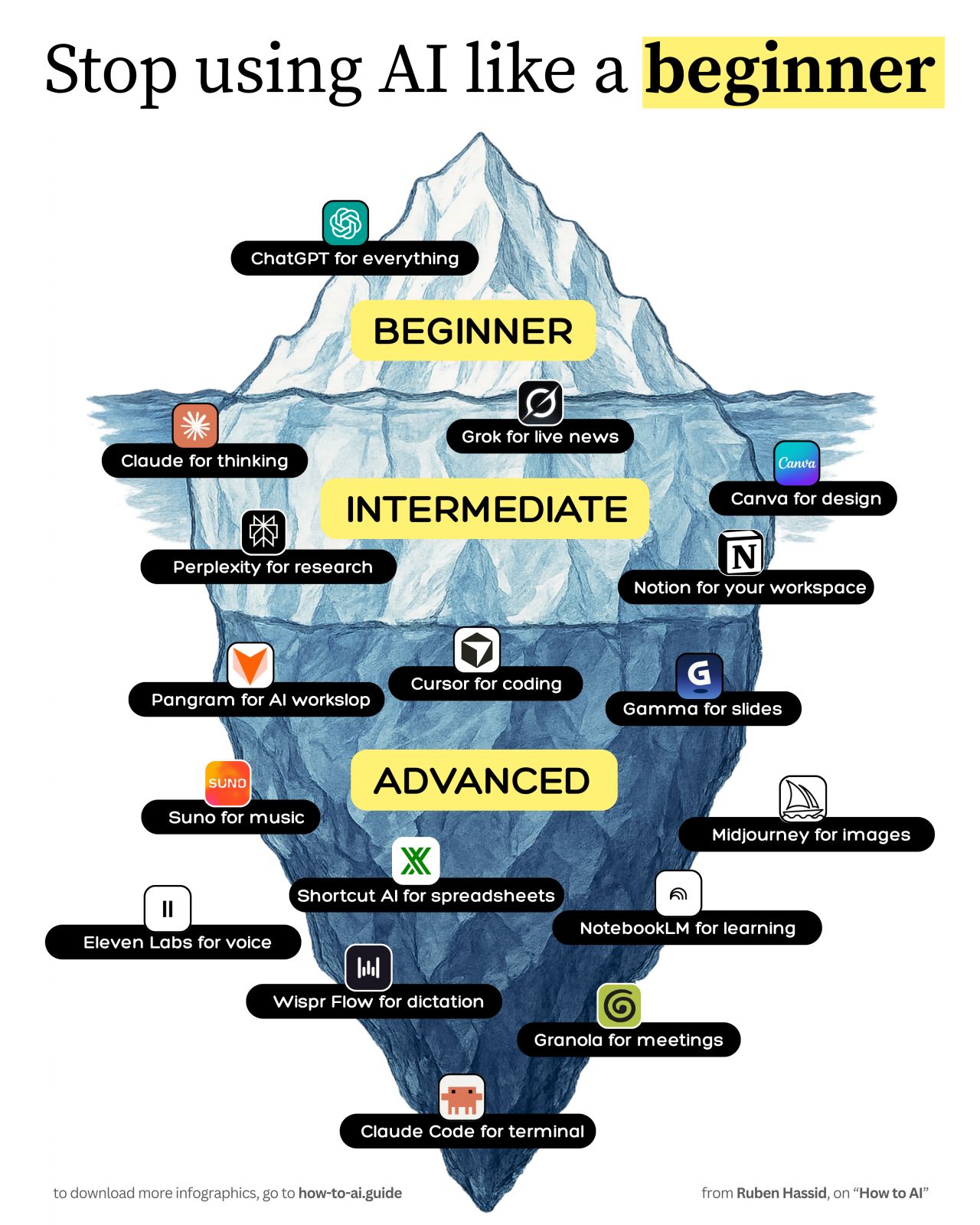
In a recent LinkedIn post, Ruben Hassid offers a structured guide to navigating the rapidly expanding universe of AI tools, moving beyond the surface-level understanding that dominates popular discourse. Hassid categorizes these tools into three tiers: “ABOVE THE WATER” (where most users are), “JUST BELOW THE SURFACE,” and “THE DEEP” (where almost nobody goes), arguing that true efficiency lies in leveraging the latter two categories.
Hassid begins by highlighting the widespread adoption of tools like ChatGPT, suggesting its common use indicates it’s merely the “tip of the iceberg.” He posits that many perceive ChatGPT primarily for image generation rather than its potential for conceptual thinking.
ChatGPT → Not for thinking. For images. Generate one, click it, and it drops into edit mode. Just say what to change. Stay on “high.”
Unlocking Deeper AI Capabilities
The core of Hassid’s analysis lies in exploring the less-utilized AI tools that offer more specialized and powerful functionalities. He meticulously details several tools that operate “JUST BELOW THE SURFACE,” each designed to address specific needs and enhance productivity in ways generic AI often cannot.
Personalized Content Creation and Research
For instance, Hassid points to Claude as a tool for project initiation where users can upload past writing samples to train the AI to adopt their unique voice. “Claude → Start a Project. Upload your best past writing in files and write instructions. Now it writes in your voice, not generic AI slop,” he explains.
Similarly, Hassid highlights Grok’s ability to access real-time information. “Grok → Add ‘check X right now’ to your prompt. Grok answers by searching the live feed with different agents at work,” he notes, emphasizing its advantage for up-to-the-minute research.
Perplexity is presented as a superior search engine alternative, “Pretty good as a search engine. Every answer has sources you can click.” Hassid also mentions Canva’s enhanced AI features for brand consistency and Notion’s integrated AI for searching across multiple platforms.
Notion → Hit “Ask AI.” Search Notion, Slack, Drive, and Gmail from one box instead of five apps. Top tier as a workspace.
Exploring the ‘Deep’ End of AI Tools
Hassid reserves the “DEEP” category for tools that require a more sophisticated understanding and application, promising significant leaps in efficiency for those who master them. He identifies Pangram as a crucial tool for refining AI-generated text to sound more human. “Pangram → Paste AI draft before you send it. It flags the lines that read as AI so you can make them human. The only AI detector I believe in,” Hassid asserts.
Other tools in this advanced tier include Cursor for comprehensive project editing based on plain English descriptions, Gamma for rapid presentation creation, and Suno for generating complete songs from lyrics. Hassid also details Shortcut AI for spreadsheet formula auditing, NotebookLM for summarizing and creating audio versions of dense reports, and ElevenLabs for voice cloning narration.
Further down the list, Hassid includes Wispr Flow for faster text input via voice commands and Granola, a notetaker that operates without joining calls. He concludes his deep dive with Claude Code, which retains project context for future sessions.
Every tool below the surface beats the tip at a job. Use enough of them to actually be போbe efficient at work.
In his concluding remarks, Ruben Hassid argues that while many are familiar with basic AI applications, true productivity gains come from exploring and integrating these specialized tools. He encourages users to move beyond the obvious and delve into the deeper functionalities that can significantly streamline workflows and enhance output.
📝 About This Content
This article is based on insights shared by Ruben Hassid on LinkedIn.
📅 Originally posted on August 10, 2026 | View original post on LinkedIn →