
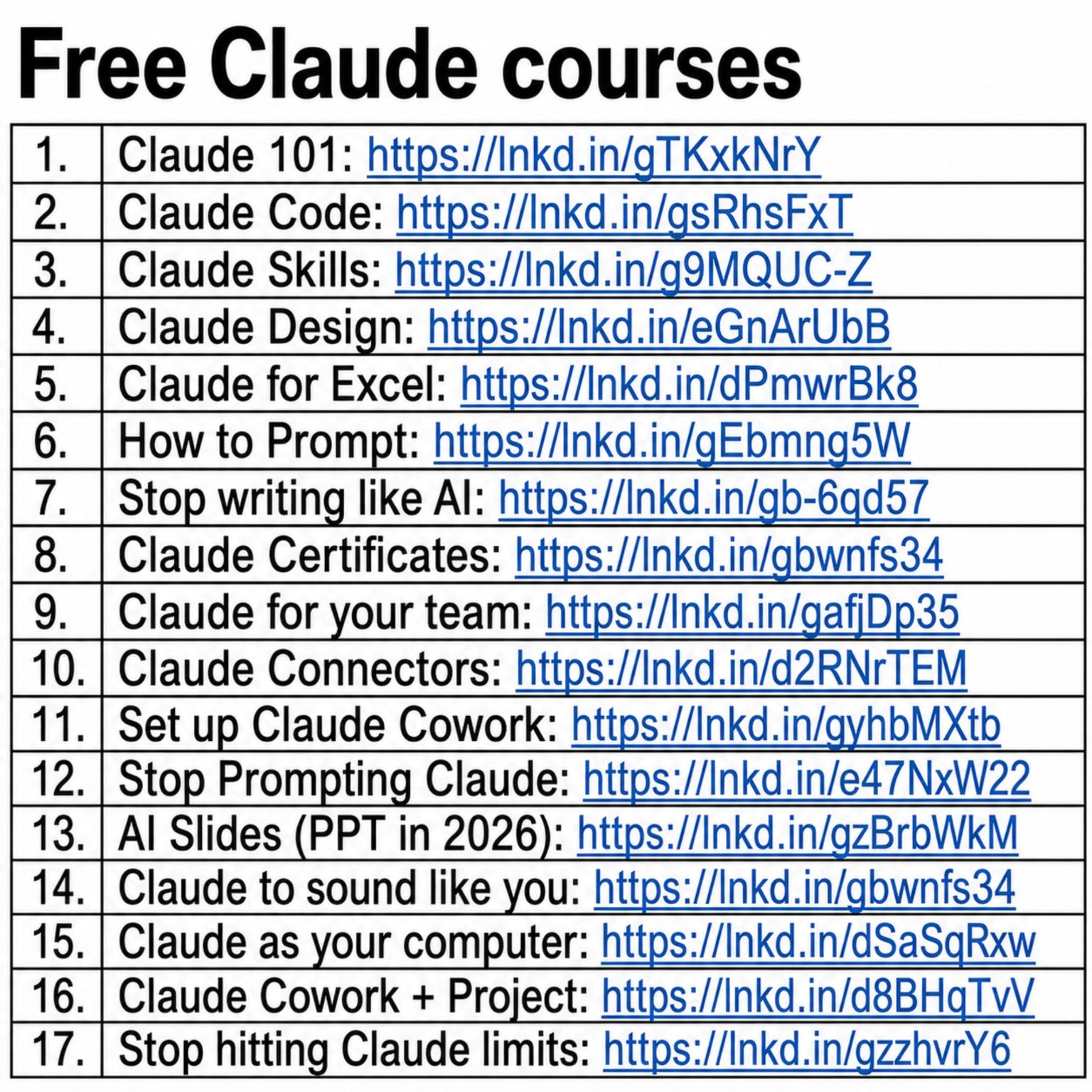
In a recent LinkedIn post, Ruben Hassid addresses common misconceptions about the learning curve associated with AI tools like Claude, asserting that mastering the technology can be achieved much faster than many believe. Hassid has compiled and shared a comprehensive list of 17 free guides designed to expedite this learning process, making advanced AI capabilities accessible within hours rather than days.
Hassid’s initiative aims to democratize AI knowledge, providing practical resources for individuals and teams looking to leverage Claude effectively. The guides cover a wide spectrum of applications, from foundational understanding to specialized uses in coding, design, and even everyday tools like Excel.
Accelerated Learning Through Focused Guides
Ruben Hassid highlights the potential for rapid skill acquisition in his post, challenging the notion that learning sophisticated AI requires extensive time commitments. He presents a curated collection of resources, each tackling a specific facet of Claude’s functionality.
People think learning Claude takes days. It doesn’t.
This direct assertion sets the stage for Hassid’s detailed offering. According to Hassid, the key lies in structured, targeted learning materials. The free guides, accessible via LinkedIn URLs, are categorized to address various user needs.
Diverse Applications of Claude AI
The breadth of topics covered in Hassid’s guides underscores the versatility of Claude. He provides resources for:
- Foundational Knowledge: ‘Claude 101’ and ‘How to Prompt’ offer essential starting points.
- Technical Skills: Guides like ‘Claude Code’ and ‘Claude for Excel’ cater to users needing specific functional expertise.
- Creative and Communication: ‘Claude Design’ and resources on making Claude ‘sound like you’ address creative applications.
- Team and Workflow Integration: Hassid offers insights into ‘Claude for your team,’ ‘Set up Claude Cowork,’ and managing usage with ‘Stop hitting Claude limits.’
As Ruben Hassid notes, these guides are structured to provide practical, actionable knowledge. For instance, the guide on prompting aims to move users beyond basic interactions to more sophisticated command structures.
Strategies for Effective AI Integration
Beyond basic usage, Hassid’s resources delve into more advanced strategies for interacting with AI. He points out the importance of nuanced prompting and understanding AI limitations.
Stop writing like AI: https://lnkd.in/gb-6qd57
This particular guide, as indicated by its title and link, suggests Hassid’s focus on enabling users to produce more natural and less robotic output when using AI tools. He also touches upon the future of AI integration, referencing ‘AI Slides (PPT in 2026),’ hinting at evolving applications.
Call to Action and Knowledge Sharing
Ruben Hassid encourages engagement with his content, providing clear instructions for his LinkedIn audience.
1. Save this list for later (three dots, top right).
2. Share it with a friend by ♻️ reposting this image.
3. Subscribe to my free newsletter: how-to-ai.guide.
In Hassid’s view, widespread adoption and effective use of AI are facilitated by accessible education and community sharing. By offering these guides and promoting further learning through his newsletter, Hassid positions himself as a key resource for navigating the rapidly evolving landscape of artificial intelligence.
The collection demonstrates a commitment to empowering users, making advanced AI literacy achievable for a broader audience. Hassid’s approach emphasizes practical application and efficient learning, aiming to equip individuals and businesses with the skills needed to thrive in an AI-driven future.
📝 About This Content
This article is based on insights shared by Ruben Hassid on LinkedIn.
📅 Originally posted on May 30, 2026 | View original post on LinkedIn →