
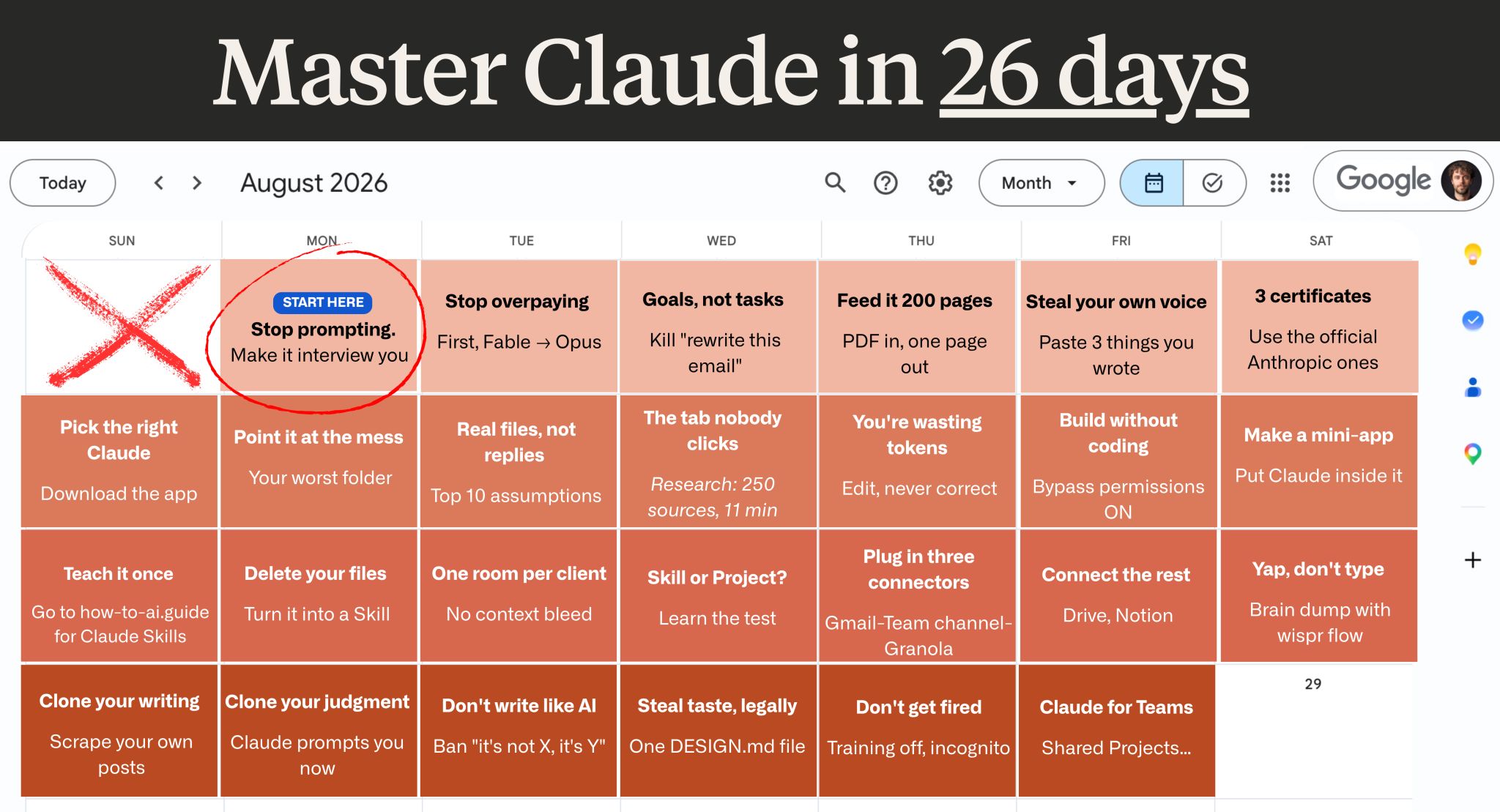
In a recent LinkedIn post, Ruben Hassid shares a comprehensive, 26-day plan designed to demystify the use of Claude AI, arguing that extensive, expensive courses are unnecessary for users to become proficient. Instead, Hassid proposes a focused, daily commitment of just 20 minutes to unlock the AI’s potential.
Hassid emphasizes a hands-on approach, starting with fundamental prompt engineering techniques. He suggests that users begin by incorporating specific phrases into their prompts to guide Claude’s responses more effectively. As Ruben Hassid notes:
“Add ‘ask me questions first’ to any prompt. Claude hands you a form. You click your answers.”
This initial step, according to Hassid, transforms interactions with Claude from simple queries into structured dialogues, allowing the AI to gather necessary context before providing a solution.
Beyond Basic Prompts: Leveraging Claude’s Advanced Features
The plan progresses to more sophisticated uses of Claude, moving beyond basic chat functionalities. Ruben Hassid highlights the importance of understanding Claude’s different models and features, such as the ‘Model picker’ and the ‘Research’ function within the ‘+’ menu. He advocates for using specific models for different tasks, recommending Fable 5 for initial messages and Opus for subsequent interactions.
Hassid’s approach encourages users to think of Claude as a tool for achieving specific goals rather than just answering questions. He illustrates this with an example:
“Stop sending tasks. ‘2 invoices unpaid, they went quiet, get me paid without burning them’ is a goal.”
This reframing, Ruben Hassid argues, pushes users to articulate their desired outcomes more clearly, leading to more targeted and effective AI assistance.
Building Custom Tools and Skills with Claude
A significant portion of Hassid’s plan is dedicated to empowering users to create their own customized AI tools and ‘Skills’. He details how to leverage Claude’s capabilities to automate repetitive tasks, manage information, and even build mini-applications.
Ruben Hassid suggests transforming personal notes and recurring tasks into ‘Skills’ that can be invoked with a simple slash command. This method, he explains, is more efficient than relying on static files. He states:
“Delete your about-me file. I was wrong about files. They rot. Make it a Skill.”
Furthermore, Hassid introduces the concept of ‘Projects’ for managing client-specific information, emphasizing the need for data segregation and privacy. He also touches upon integrating Claude with other productivity tools like Drive and Notion, advising users to manage connector loads carefully to maintain efficiency.
Optimizing Interaction and Privacy
The guide also offers practical advice on optimizing interaction methods and ensuring data privacy. Ruben Hassid recommends using voice input, noting that speaking is significantly faster than typing, and suggests configuring privacy settings to prevent personal data from being used for training, especially when handling client information.
Hassid concludes his post by emphasizing the long-term benefits of mastering Claude, particularly the application of Day 1’s prompt improvement and Day 14’s skill creation. He believes these two steps alone can dramatically enhance a user’s efficiency and effectiveness with the AI. For those seeking further assistance, Ruben Hassid points readers to his free newsletter, which includes a pre-built Claude Skills library.
📝 About This Content
This article is based on insights shared by Ruben Hassid on LinkedIn.
📅 Originally posted on August 9, 2026 | View original post on LinkedIn →