
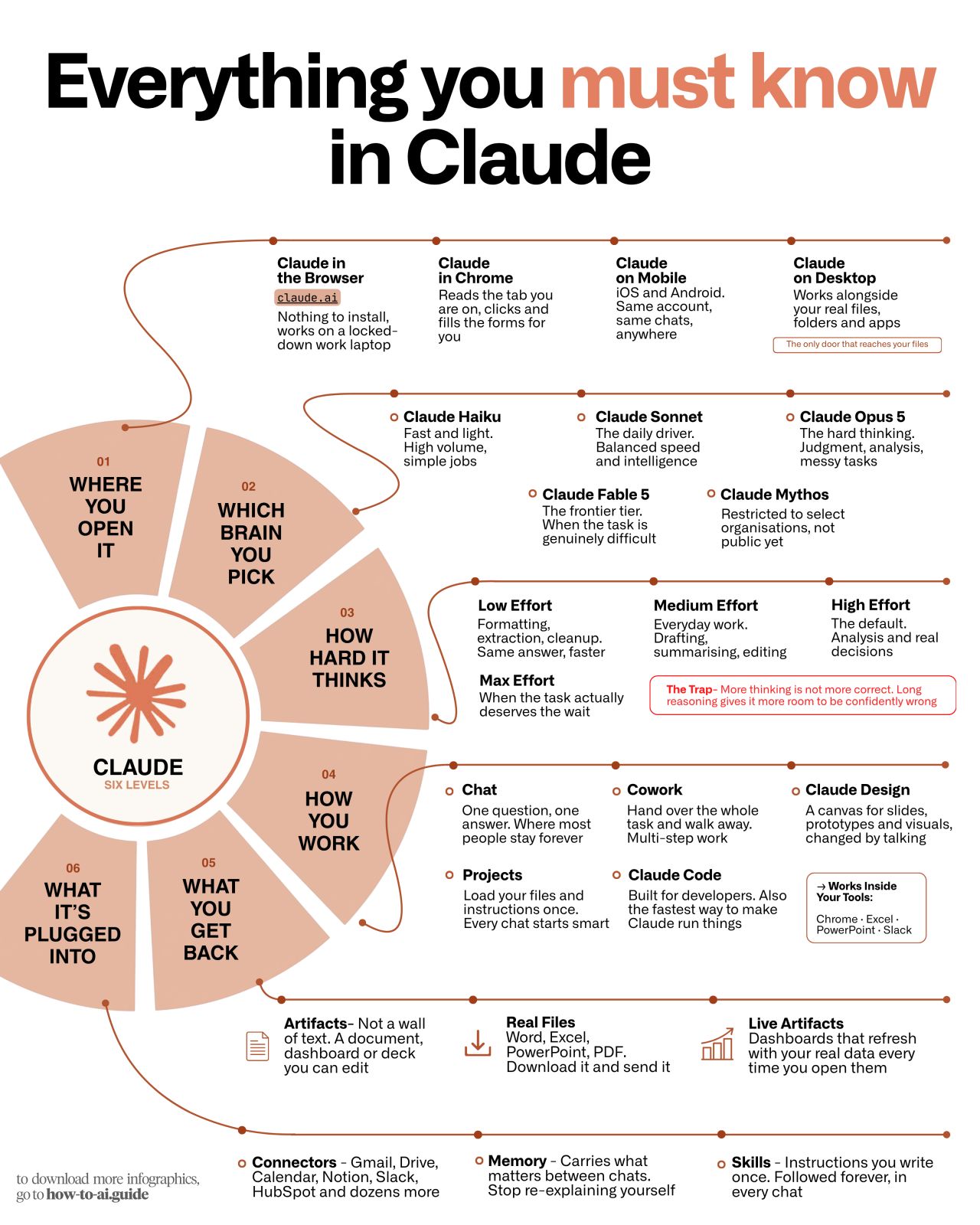
In a recent LinkedIn post, Ruben Hassid offers a structured, six-level approach to effectively utilize the Claude AI assistant, moving beyond basic interactions to advanced application. Hassid emphasizes that most users only scratch the surface of Claude’s capabilities, often stuck at what he terms ‘Level One’. He provides a practical guide designed to help users unlock the full potential of the AI tool for various business tasks.
Understanding the Levels of Claude Engagement
Hassid’s framework begins with ‘Level One: Install Claude app, even if you never use it.’ This foundational step, according to Hassid, is about preparedness. He explains that while browser use is common, having the desktop app installed ensures immediate access when tasks require direct file interaction, preventing delays.
“You will use the browser 90% of the time, and that’s fine. But the day you need Claude to touch a real folder, you don’t want to be downloading, logging in and re-granting permissions while the work waits. Set it up on a slow Tuesday. Use it on a fast one.”
Moving to ‘Level Two: Escalate on failure, not on anticipation,’ Hassid advises against defaulting to the most powerful AI model. Instead, he suggests starting with a less resource-intensive model like Sonnet. As Ruben Hassid notes, the AI’s failure to meet a task’s requirements is the key indicator that a more advanced model is necessary. This approach conserves computational resources and highlights genuinely complex tasks.
Optimizing AI Interactions
Hassid’s ‘Level Three: One correct answer = low effort’ focuses on task type. He argues that tasks with a single, definitive answer, such as reformatting a table, should be treated as such, rather than allowing the AI to generate lengthy, unnecessary explanations. Conversely, tasks involving trade-offs, like pricing decisions, benefit from the AI’s analytical capabilities.
“The mistake: turning thinking up on a task that had one right answer. You get a reasoned paragraph explaining why the wrong answer is correct.”
For efficient workflow management, Hassid introduces ‘Level Four: Count your messages before you start.’ He posits that if a task requires more than three back-and-forth prompts, it might be better suited for a different tool or a more structured project setup within Claude. This prevents inefficient use of conversational AI for complex, multi-step projects. Similarly, ‘Level Five: Say the output format in your 1st sentence’ is crucial for streamlining results. Hassid stresses the importance of specifying desired output formats, like a Word document or an Excel model, upfront to avoid wasted prompts and reformatting efforts.
Developing Custom AI Skills
The final level, ‘Level Six: Turn your corrections into instructions,’ is presented as a method for creating personalized AI ‘Skills’. Ruben Hassid explains that repeated corrections on the same issue should be codified into explicit instructions. This transforms iterative feedback into reusable commands, significantly reducing the need for repetitive corrections over time.
“Correct it twice → write it down once → never say it again. Most people spend a year giving the same three corrections daily.”
Hassid concludes his post with a practical ‘first 20 minutes’ checklist for new users, emphasizing app installation, minimal settings, connecting a single tool, creating a project for recurring work, and defining the first custom ‘Skill’ based on a past correction. He also points readers to his ‘how-to-ai.guide’ for pre-made Claude Skills.
📝 About This Content
This article is based on insights shared by Ruben Hassid on LinkedIn.
📅 Originally posted on August 11, 2026 | View original post on LinkedIn →