
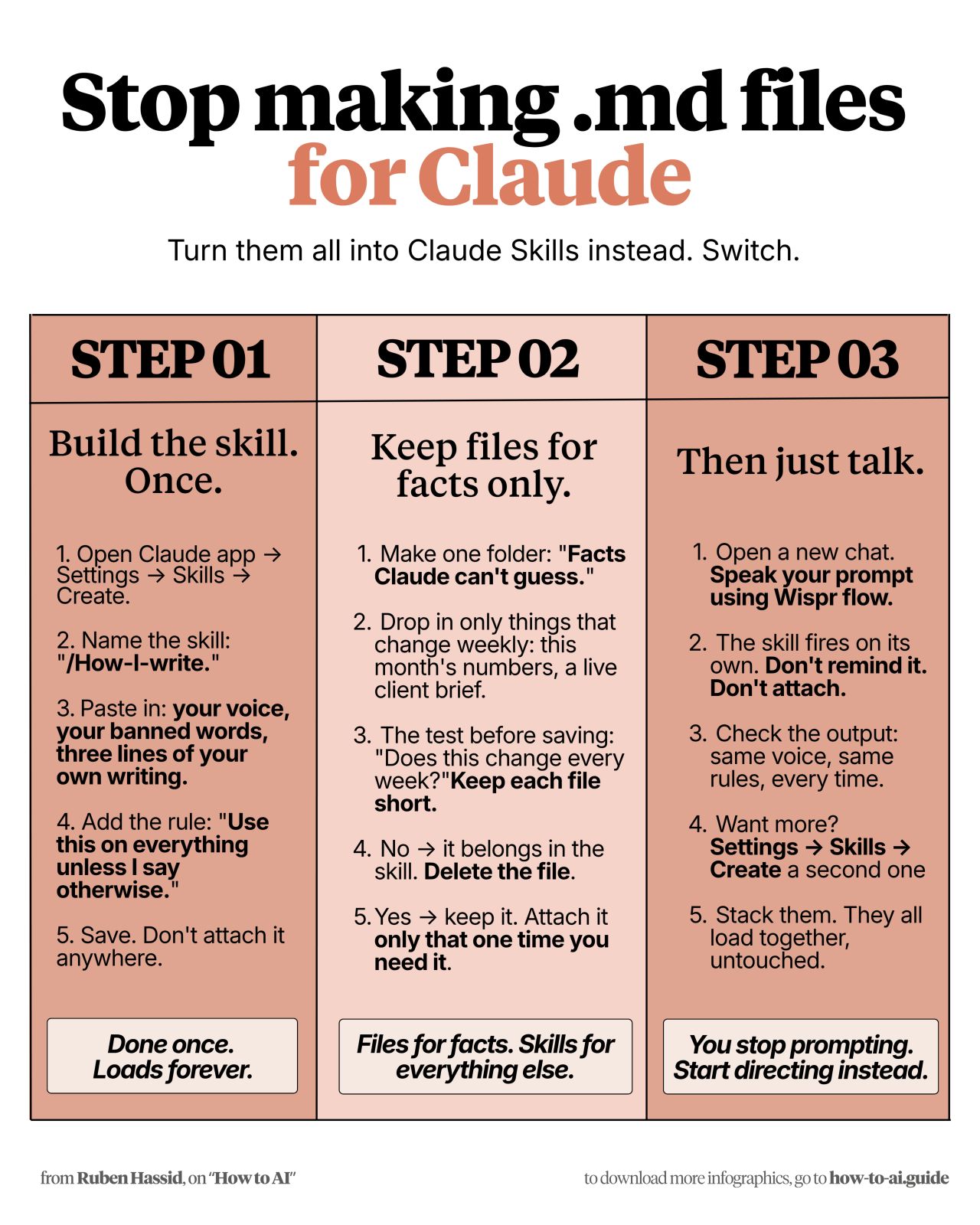
In a recent LinkedIn post, Ruben Hassid explores an innovative approach to enhancing user interaction with AI, specifically focusing on Anthropic’s Claude. Hassid argues that traditional methods of managing AI prompts, such as creating numerous markdown (.md) files, are inefficient and suggests a more streamlined solution using Claude’s built-in ‘Skills’ feature. This method, according to Hassid, allows users to define custom voices, rules, and writing styles that the AI can automatically apply across all conversations without explicit prompting.
Rethinking Prompt Management for AI
Hassid’s core argument is that users should move away from maintaining extensive collections of .md files for specific AI instructions. He posits that these files become redundant once Claude’s ‘Skills’ are properly configured. The process he outlines involves navigating to Claude’s settings, creating a new Skill, and naming it descriptively, such as “/How-I-write”.
“My voice: [how you talk. e.g: short sentences, direct, no fluff] Banned words: delve, unlock, leverage, [add yours] My writing samples: [paste your writing pieces] Rule: Use this on everything unless I say otherwise.”
As Ruben Hassid notes, this template allows users to define their preferred communication style, list any words the AI should avoid, and provide examples of their own writing to guide the AI’s output. The critical instruction is to apply these skills universally unless specifically overridden.
The ‘Skills’ Advantage Over .md Files
Hassid emphasizes that once a Skill is created and saved, it is automatically available in all new chats without the need to attach files or re-state instructions. This eliminates the weekly need to check and update prompt files.
Distinguishing Between Skills and Fact-Based Files
He proposes a clear distinction: Skills are for defining how the AI should behave, its tone, and its rules, while traditional files should be reserved for factual information that Claude cannot inherently guess. Hassid suggests a test for existing .md files: “Does this need editing or changing every week?” If the answer is no, it should be integrated into a Skill. If yes, it belongs in a separate folder designated for ‘Facts Claude can’t guess’.
“Files for facts. Skills for everything else.”
This categorization, according to Hassid, ensures that the AI’s core behavior is consistently governed by user-defined Skills, while specific, dynamic factual data is handled separately and efficiently.
A Practical Workflow for AI Integration
Ruben Hassid outlines a practical workflow for implementing this strategy. After setting up a Skill, users can initiate a new chat and simply ask for their desired output without mentioning the Skill or attaching any files. The AI, having loaded the Skill automatically, should then produce output in the user’s defined voice and adhere to their rules.
“Something off? Fix the Skill once – not the chat.”
This iterative approach, as Hassid points out, means that any necessary adjustments are made to the Skill configuration itself, rather than repeatedly correcting individual chat outputs. He extends this concept to other workflows, suggesting the creation of Skills for tasks like “/Client-emails” or “/How-I-design”.
Accessing a Pre-built Skill Library
For users looking to bypass the setup process, Hassid also offers a shortcut. He directs readers to how-to-ai.guide, where they can find a welcome email containing a link to a Notion library. This library reportedly includes over 26 pre-built Claude Skills that can be downloaded and uploaded directly into Claude’s settings.
In summary, Ruben Hassid’s LinkedIn post provides a detailed, actionable guide for users of Claude AI to enhance their productivity and consistency by leveraging the platform’s ‘Skills’ feature, advocating for a more integrated and less cumbersome approach to AI prompt management.
📝 About This Content
This article is based on insights shared by Ruben Hassid on LinkedIn.
📅 Originally posted on July 8, 2026 | View original post on LinkedIn →