
In a recent LinkedIn post, Sachin Rekhi, founder of
AI
Tool
Directory
,
offers a valuable mental model for understanding and selecting the right Artificial Intelligence tool for specific tasks. As the AI landscape rapidly expands with a proliferation of new applications, Rekhi aims to simplify the decision-making process for users.
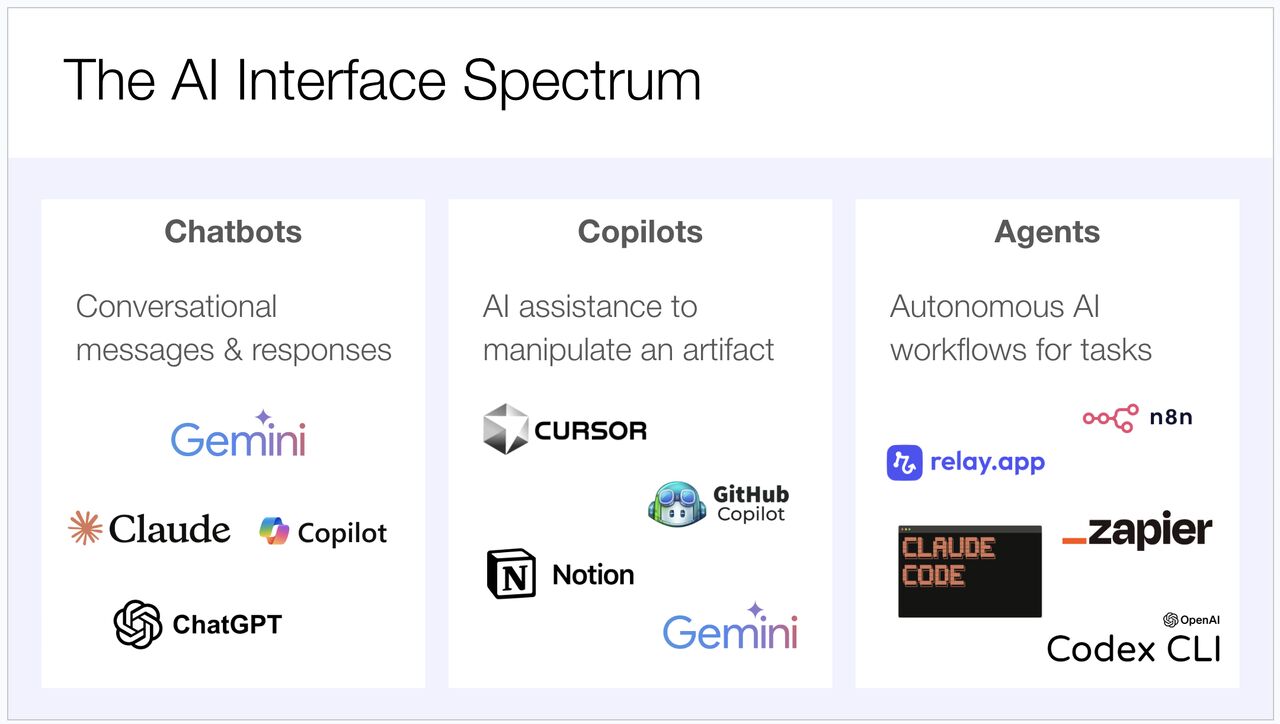
Rekhi’s framework categorizes AI tools into three distinct types: Chatbots, Copilots, and Agents. He emphasizes that this categorization helps in determining the most effective tool for a given job.
“What’s the right AI tool for the job? The answer has gotten far more complicated today with the proliferation of tools.”
According to Rekhi, this complexity necessitates a structured approach to AI tool selection. His mental model is designed to provide clarity amidst the growing number of AI interfaces available.
Understanding the AI Tool Categories
Rekhi breaks down the AI ecosystem into three primary categories, each with its own function and use case.
Chatbots: The Exploratory Foundation
The post begins by defining chatbots as the category that initiated the widespread adoption of AI tools. Rekhi identifies popular examples such as ChatGPT, Claude, and Gemini. He highlights their primary utility in handling exploratory questions and serving as a daily personal driver for many users.
“Chatbots – This is the category that started it all. ChatGPT, Claude, Gemini. Simple question & answers end up being useful for a whole host of exploratory questions.”
As Rekhi notes, chatbots remain a fundamental tool for initial inquiry and information gathering, providing a straightforward interface for users to interact with AI.
Copilots: Manipulating Digital Artifacts
The next category discussed is ‘Copilots,’ which Rekhi describes as tools designed to help users manipulate existing digital artifacts. Initially focused on code, with tools like Cursor leading the way, copilots have expanded their reach to other document types.
Rekhi points out the integration of AI copilots within platforms like Notion, Google Docs, and Google Sheets. He advocates for using the appropriate copilot whenever the goal is to modify or enhance a specific artifact.
“Copilots then emerged as a way to use AI to manipulate artifacts. Code was the original artifact with tools like Cursor. But copilots expanded beyond code to documents with AI tooling in Notion, Google Docs, Google Sheets, and more.”
This category underscores the AI’s role in augmenting existing workflows and content creation processes.
Agents: Executing Autonomous Workflows
Finally, Rekhi introduces ‘Agents’ as fully autonomous AIs built to execute entire workflows independently. He distinguishes between coding agents, such as Claude Code and Codex, and workflow automation tools like Zapier, Relay, and n8n.
In Rekhi’s view, agents are the go-to solution when a user needs to create a repeatable, autonomous workflow. This represents a significant step towards AI-driven automation of complex processes.
“Agents have emerged as fully autonomous AIs designed to execute workflows all on their own… Whenever I want to create a fully autonomous workflow that I can repeatedly run, I reach for an agent.”
Applying the Mental Model
Rekhi concludes his post by explaining how he personally applies this framework. Every time he considers using an AI tool, he asks himself whether a chatbot, a copilot, or an agent is the most suitable choice for the task at hand.
This simple yet effective question, as articulated by Sachin Rekhi, provides a practical method for users to navigate the increasingly complex AI tool market and leverage AI more effectively for their specific needs.
📝 About This Content
This article is based on insights shared by Sachin Rekhi on LinkedIn.
📅 Originally posted on March 11, 2026 | View original post on LinkedIn →