
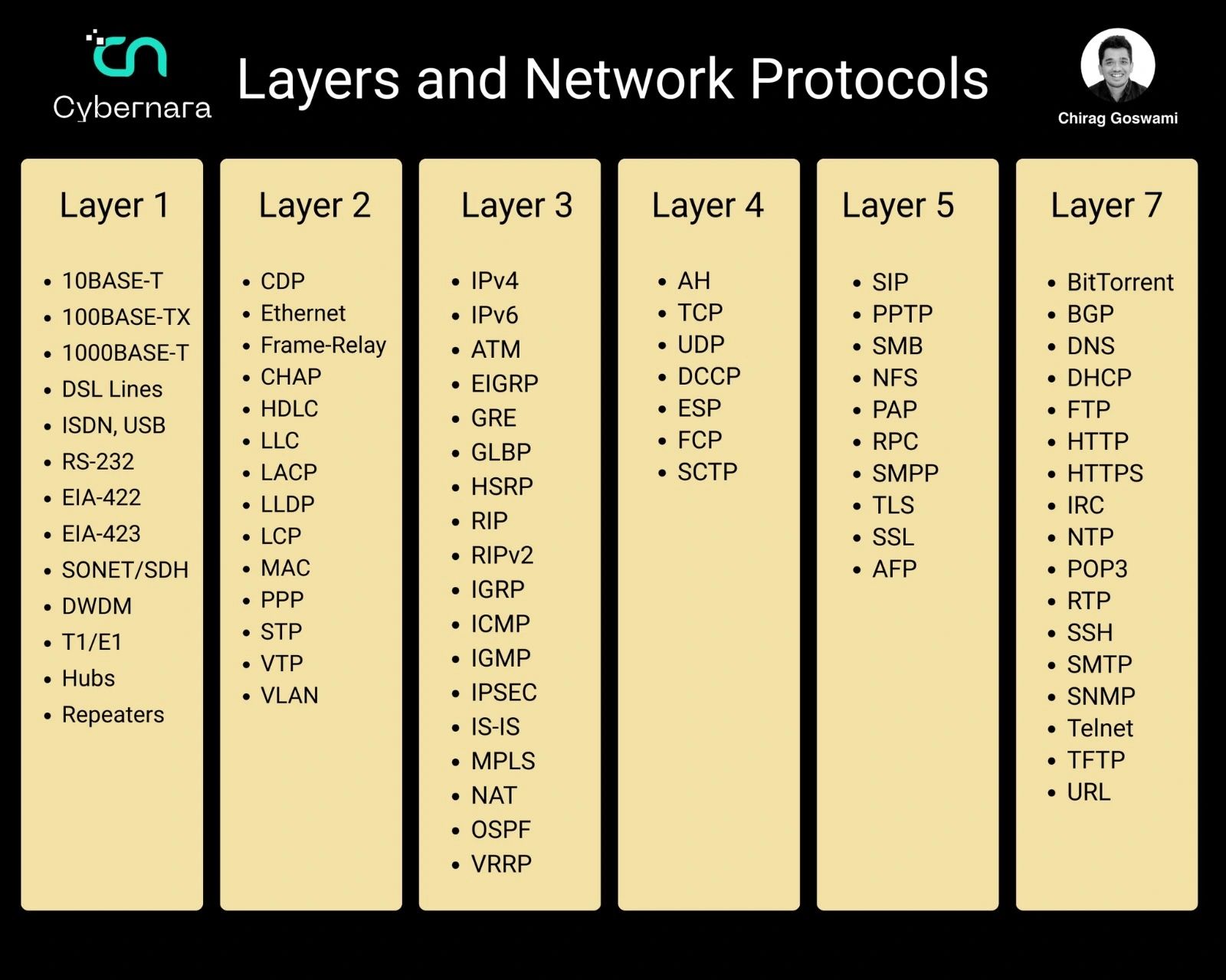
In a recent LinkedIn post, Chirag Goswami breaks down the often complex topic of network layers, offering a simplified guide for IT and cybersecurity professionals. Goswami’s post aims to demystify how data moves between devices by explaining the function of each layer in a network model.
Goswami emphasizes the foundational importance of understanding these layers for effective troubleshooting and network management. He writes:
Networking becomes easier when you understand layers. 🌐 Each layer has a job. Together, they move data from one device to another.
The Core Network Layers Explained
Chirag Goswami’s post systematically outlines several key network layers, detailing their primary functions and providing concrete examples. This layered approach, often associated with models like OSI or TCP/IP, is crucial for understanding network communication.
Physical Layer (Layer 1)
According to Goswami, the Physical Layer is concerned with the tangible aspects of data transmission. This includes the hardware components and the physical medium through which signals travel.
Cables, signals, connectors, hardware transmission. Examples: Ethernet cable, fiber, hubs.
As Goswami points out, this is the bedrock upon which all other network functions are built.
Data Link and Network Layers (Layers 2 & 3)
Moving up, Goswami highlights the Data Link Layer (Layer 2) for its role in managing data transfer within a local network segment using MAC addresses. Following this, the Network Layer (Layer 3) is described as the component responsible for logical addressing (IP addresses) and routing data across different networks.
Goswami provides examples for these layers, noting:
Layer 2 – Data Link
Moves data inside the local network using MAC addresses. Examples: Ethernet, VLAN, PPP, STP.
Layer 3 – Network
Handles IP addressing and routing between networks. Examples: IPv4, IPv6, ICMP, OSPF, RIP.
Transport Layer (Layer 4)
The Transport Layer, as explained by Goswami, is vital for ensuring reliable and efficient data delivery between end systems. It manages aspects like connection reliability and data flow control.
Layer 4 – Transport
Controls delivery, reliability, speed, ports. Examples: TCP, UDP, SCTP.
Session Layer (Layer 5) and Application Layer (Layer 7)
Goswami also touches upon the Session Layer for managing communication sessions and the Application Layer (Layer 7), which is the interface that users and applications interact with directly. He includes protocols like HTTP, HTTPS, and DNS as examples of the Application Layer.
Practical Application: Browsing the Web
To illustrate how these layers work in concert, Chirag Goswami uses the common action of opening a website as a real-world example. This practical demonstration helps to solidify the understanding of the abstract concepts.
Goswami outlines the process: “Opening a website uses multiple layers at once: Layer 1 = cable/Wi-Fi signal, Layer 3 = IP routing, Layer 4 = TCP port 443, Layer 7 = HTTPS webpage.”
The Value for IT Professionals
Chirag Goswami concludes by underscoring the practical benefits of this knowledge for those in IT and cybersecurity roles. He argues that a solid grasp of network layers directly translates to improved troubleshooting capabilities and a more robust understanding of network security.
“If you work in IT or cybersecurity, learning layers helps you troubleshoot faster,” Goswami states, reinforcing the value proposition of his detailed breakdown.
The post, which also briefly mentions Cybernara’s services in network security, serves as an educational resource, highlighting Chirag Goswami’s expertise in making technical subjects accessible.
📝 About This Content
This article is based on insights shared by Chirag Goswami on LinkedIn.
📅 Originally posted on April 23, 2026 | View original post on LinkedIn →