
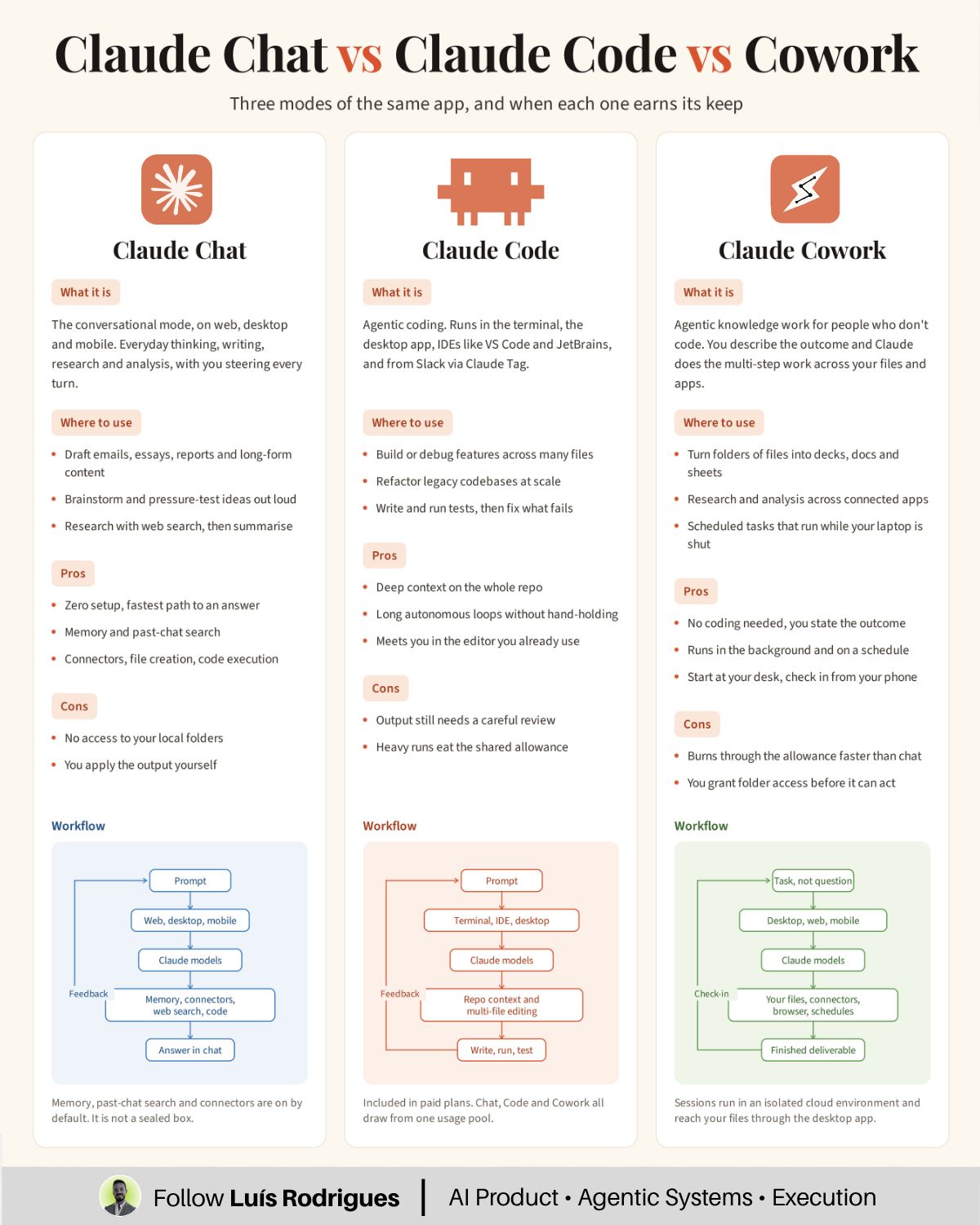
In a recent LinkedIn post, Luís Rodrigues explores the underutilized capabilities of the AI tool Claude, arguing that many users are missing out on its full potential by sticking to a single interface. Rodrigues aims to educate users on the distinct functionalities of Claude’s Chat, Code, and Cowork modes, emphasizing how each is tailored for different types of tasks and how understanding these can optimize both productivity and budget.
Rodrigues begins by challenging a common misconception: that a single Claude tab represents the entirety of the product. He asserts that Claude is, in fact, a multifaceted tool with three distinct environments, each leveraging the same underlying models and sharing a single usage allowance.
“Most people use one Claude tab and assume that’s the whole product. It’s not. There are three. Chat, Code and Cowork.”
The core of Rodrigues’s message is that the choice of Claude environment directly impacts the amount of manual work a user still needs to perform. He breaks down each mode to clarify its specific applications and benefits.
Claude Chat: For Language-Based Workflows
According to Luís Rodrigues, Claude Chat is designed for tasks that primarily involve natural language processing. He illustrates its utility with examples such as transforming messy notes into concise briefs with actionable recommendations or generating decision memos that outline options, trade-offs, and next steps.
“For work that happens in language. Messy notes into a one-page brief with a recommendation. A decision memo with options, trade-offs, and a next step. You stay in the loop on every turn.”
In this mode, as Rodrigues points out, the user remains actively involved in every stage of the interaction, guiding the AI through iterative refinement.
Claude Code: Streamlining Development Tasks
Luís Rodrigues highlights Claude Code as the specialized environment for work residing within code repositories. This mode is particularly effective for building features that span multiple files or debugging modules without disrupting existing functionality. Rodrigues clarifies that Claude Code operates across various platforms, including terminals, desktop applications, VS Code, and JetBrains IDEs, extending beyond simple command-line interfaces.
Claude Cowork: Automating File-Centric Operations
The third environment, Claude Cowork, is presented by Rodrigues as the solution for tasks centered around file manipulation and transformation. He provides compelling examples, such as converting numerous PDFs into a single, clean spreadsheet or transforming a folder of raw data exports into a polished presentation deck. A particularly intriguing use case mentioned is the automated generation of a Monday report pack that can be built overnight.
“You describe the outcome. It handles the planning and execution.”
This mode, as Rodrigues explains, allows users to define the desired end result, with the AI taking responsibility for the planning and execution phases.
Common Mistakes and Budget Management
Rodrigues also identifies three common mistakes users make that hinder their effective use of Claude and potentially increase costs:
- Using a single chat for all tasks: He argues that mixing different types of requests, such as contract reviews and hiring inquiries, within the same chat history forces the model to process all previous data for each new prompt, increasing computational load and cost. Rodrigues advises, “New topic, new chat.”
- Assigning file-heavy work to Claude Chat: Sending tasks better suited for Cowork, like processing multiple tables or documents, to the Chat interface can lead to partial automation and significant manual follow-up. Rodrigues points out that Cowork could have handled all thirty tables, whereas Chat might only process one effectively.
- Ignoring the shared budget: Rodrigues emphasizes that a demanding Code session in the morning consumes the same usage allowance as a less intensive Cowork job later in the day. He encourages users to be mindful of their overall usage to avoid unexpected budget impacts.
In conclusion, Luís Rodrigues’s insights offer a practical guide for users looking to maximize their efficiency and cost-effectiveness when working with Claude. By understanding and applying the distinct capabilities of Chat, Code, and Cowork, professionals can better leverage AI for a wider range of business tasks.
📝 About This Content
This article is based on insights shared by Luís Rodrigues on LinkedIn.
📅 Originally posted on September 9, 2026 | View original post on LinkedIn →